> ## Documentation Index
> Fetch the complete documentation index at: https://utopia.mintlify.site/llms.txt
> Use this file to discover all available pages before exploring further.
# Recraft Text to Image API Node ComfyUI Official Example
> Learn how to use the Recraft Text to Image API node in ComfyUI
The [Recraft Text to Image](/built-in-nodes/api-node/image/recraft/recraft-text-to-image) node allows you to create high-quality images in various styles using Recraft AI's image generation technology based on text descriptions.
In this guide, we'll show you how to set up a text-to-image workflow using this node.
To use the API nodes, you need to ensure that you are logged in properly and using a permitted network environment. Please refer to the [API Nodes Overview](/tutorials/api-nodes/overview) section of the documentation to understand the specific requirements for using the API nodes.
Make sure your ComfyUI is updated.
* [Download ComfyUI](https://www.comfy.org/download)
* [Update Guide](/installation/update_comfyui)
Workflows in this guide can be found in the [Workflow Templates](/interface/features/template).
If you can't find them in the template, your ComfyUI may be outdated.(Desktop version's update will delay sometime)
If nodes are missing when loading a workflow, possible reasons:
1. Not using the latest ComfyUI version(Nightly version)
2. Using Stable or Desktop version (Latest changes may not be included)
3. Some nodes failed to import at startup
## Recraft Text to Image API Node Workflow
### 1. Download the Workflow File
The workflow information is included in the metadata of the image below. Download and drag it into ComfyUI to load the workflow.

### 2. Follow the Steps to Run the Workflow
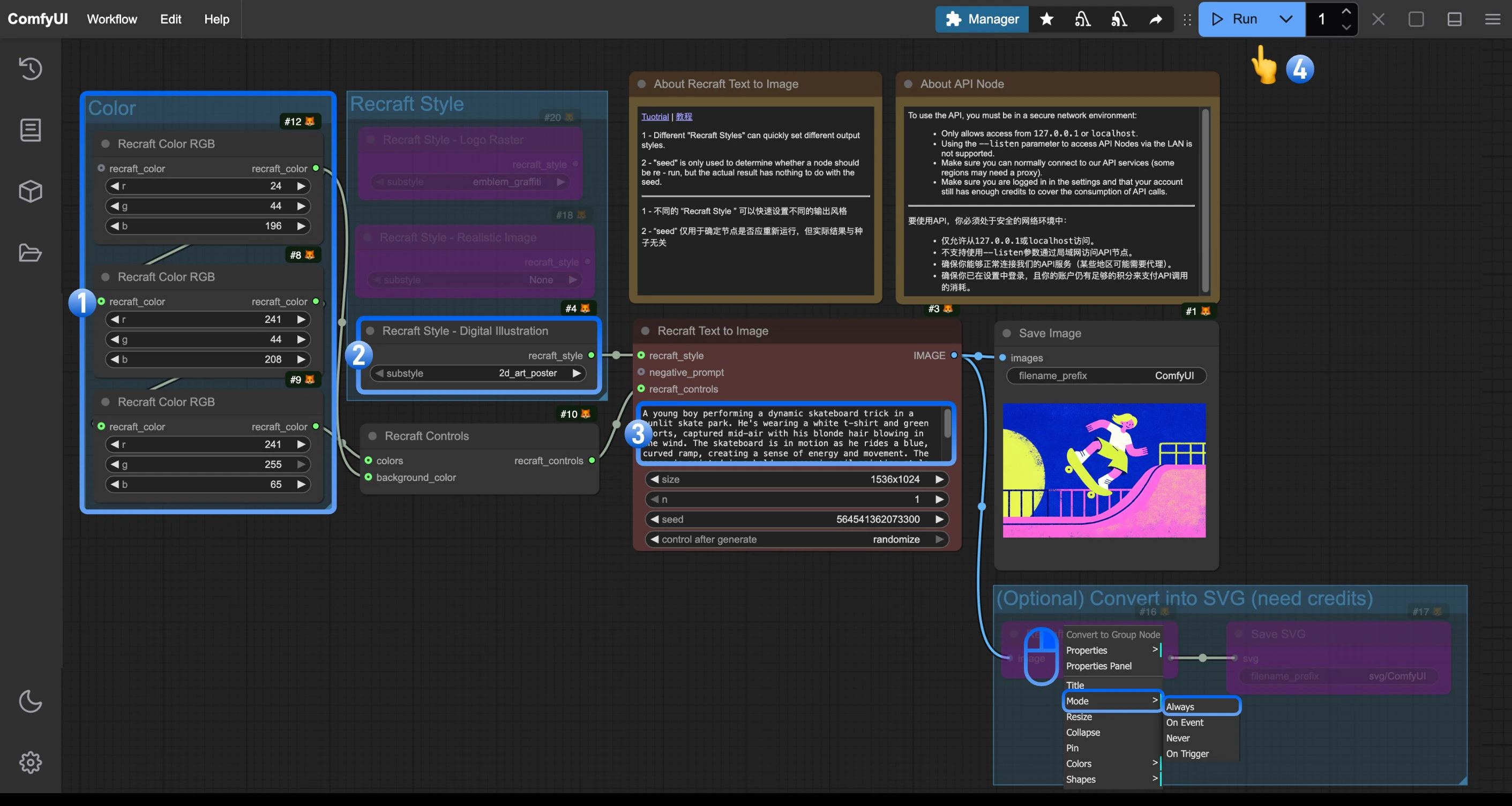 Follow these numbered steps to run the basic workflow:
1. (Optional) Change the `Recraft Color RGB` in the `Color` node to your desired color
2. (Optional) Modify the `Recraft Style` node to control the visual style, such as digital art, realistic photo, or logo design. This group includes other style nodes you can enable as needed
3. (Optional) Edit the `prompt` parameter in the `Recraft Text to Image` node. You can also change the `size` parameter
4. Click the `Run` button or use the shortcut `Ctrl(cmd) + Enter` to generate the image
5. After the API returns the result, you can view the generated image in the `Save Image` node. The image will also be saved to the `ComfyUI/output/` directory
> (Optional) We've included a **Convert to SVG** group in the workflow. Since the `Recraft Vectorize Image` node in this group consumes additional credits, enable it only when you need to convert the generated image to SVG format
### 3. Additional Notes
* **Recraft Style**: Offers various preset styles like realistic photos, digital art, and logo designs
* **Seed Parameter**: Only used to determine if the node should run again, the actual generation result is not affected by the seed value
## Related Node Documentation
Check the following documentation for detailed parameter settings of the nodes
Documentation for the Recraft Text to Image API node
Documentation for the Recraft Style - Realistic Image API node
Documentation for the Recraft Controls API node
Follow these numbered steps to run the basic workflow:
1. (Optional) Change the `Recraft Color RGB` in the `Color` node to your desired color
2. (Optional) Modify the `Recraft Style` node to control the visual style, such as digital art, realistic photo, or logo design. This group includes other style nodes you can enable as needed
3. (Optional) Edit the `prompt` parameter in the `Recraft Text to Image` node. You can also change the `size` parameter
4. Click the `Run` button or use the shortcut `Ctrl(cmd) + Enter` to generate the image
5. After the API returns the result, you can view the generated image in the `Save Image` node. The image will also be saved to the `ComfyUI/output/` directory
> (Optional) We've included a **Convert to SVG** group in the workflow. Since the `Recraft Vectorize Image` node in this group consumes additional credits, enable it only when you need to convert the generated image to SVG format
### 3. Additional Notes
* **Recraft Style**: Offers various preset styles like realistic photos, digital art, and logo designs
* **Seed Parameter**: Only used to determine if the node should run again, the actual generation result is not affected by the seed value
## Related Node Documentation
Check the following documentation for detailed parameter settings of the nodes
Documentation for the Recraft Text to Image API node
Documentation for the Recraft Style - Realistic Image API node
Documentation for the Recraft Controls API node